
| Course | Demo Date | Time | Mode | Attend Today! |
|---|---|---|---|---|
| SAP Success Factors | Nov-6th | 9:00 AM (IST) | Offline | Register now |
| SAP HANA Dev | Nov-16th | 10:00 AM (IST) | Online | Register now |
| SAP SAC | Dec-7th | 9:00 AM (IST) | Offline | Register now |
| SAP GRC | Dec-22nd | 6:00 PM (IST) | Online | Register now |
SAP Success Factors Training in Hyderabad
The SAP ABAP course provides a deep understanding of the ABAP programming language, data dictionary, and development tools used in SAP systems. This module is ideal for students aspiring to build a career in SAP technical development, as it focuses on real-time coding, debugging, and integration techniques.
Understanding SAP systems, overview of SAP landscape, ABAP architecture, and basics of programming in SAP environment.
Learn about tables, views, domains, data elements, indexes, and foreign key relationships with hands-on exercises.
Practical training on classical and interactive reports, ALV reports, SmartForms, and SAP Scripts development.
The SAP ABAP course includes real-time projects, 100% practical sessions, and detailed coverage of RICEF objects, performance tuning, debugging, and enhancements. Students gain expertise in object-oriented ABAP and integration with other SAP modules.
Eligibility for a course typically depends on the following:
- Prerequisites: Required prior courses or skills.
- Level of Study: Undergraduate, graduate, or continuing education.
- Program Requirements: Specific to your major or program.
- Open Enrollment: Available to all students as an elective.
- Special Permissions: Might need instructor or department approval.
- Availability: Limited seats may give priority to certain students.
- Location/Delivery: Online or specific campus availability.
Check the course catalog or consult with an academic advisor for specifics.
The SAP ABAP course includes real-time projects, 100% practical sessions, and detailed coverage of RICEF objects, performance tuning, debugging, and enhancements. Students gain expertise in object-oriented ABAP and integration with other SAP modules.
SAP ABAP professionals are in high demand for customization and enhancement of SAP applications. Career roles include ABAP Developer, Technical Consultant, and SAP Integration Specialist, with opportunities across global IT and ERP firms.
The SAP ABAP course fee varies based on training mode (Online / Offline). Contact our support team to get the latest offers, EMI options, and special group discounts available for early enrollments.
Reviews
-

-

We denounce with righteous indignation and dislike men who are so beguiled and demoralized by the charms of pleasure of the moment, so blinded by desire that the cannot foresee the pain and trouble that.
Add a review
Master SAP Success Factors Skills, Secure Your Future SAP Career
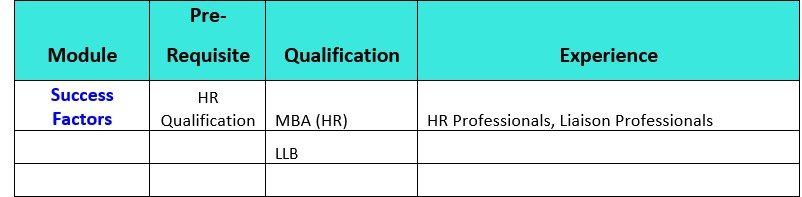
Success Factors (SF) Module is Cloud Version of SAP HR Module. People who are graduated with HR Degrees like MBA (HR), MHRM etc., can learn SF Module and become SAP Consultants. Working Professionals who are working as HR Executives, HR Managers, Liaising Officers and Lawyers can learn SAP Success Factors Module and become a Consultant.
SAP SUCCESS FACTORS - COURSE CONTENT
SAP SuccessFactors (SF) is a Cloud-Based Human Capital Management (HCM) Module of SAP Software. The HR, talent management, employee experience, and workforce-related activities or processes of an Organization are managed and streamlined with the help of the SuccessFactors Module.
I) Module: Introduction to Mastery
- Introduction to Success Factors Products
- Instance, Provisioning Systems explanation
- Technical Architecture
- Integration Technology/Tools
- Bizxpert Methodology — Implementation Methodology.
- Basic company settings in Provisioning System
- Creating administrators in Provisioning System
- Creating administrators in Instance
- Instance basic settings — Passwords, Home Page, Welcome Menu, Comp info.
- Administrator tools
- Managing To DO List
- Manage V12 Home Page — Success Factors Home Page customization.
- Theme Manager — Customization Organization Themes.
- Admin tools 2.0 and the Old Admin Over View.
- Success Factors Revolution UI
- Commonly used terms
- Default User Permissions.
- Admin Privileges
- Proxy Management
- Setting up company Logos
User & Data Management
- Manage Data User Records
- Employee Data File
- Permissions
- Password Policies
- Email Notifications Customization.
- Text Customization in Instance
- People Search
- Rating Scales
- Route Maps (Workflow)
- Launching forms
- Modifying Existing Form Route Map Steps by Administrator
- Job Families & Roles
- Competencies
- Employee Profile
- Customizing Employee Profile (Layout Configuration).
Technical & Interfaces
- XML and Data models
- Custom Fields Creation in the Data Models.
- Interfaces between SAP & Success factors (Data extraction)
- Pick list Management.
- Jobs Scheduling & Execution of Jobs in Success Factors.
- Success Factors Language Packs.
- Resetting user accounts or Passwords.
- User Groups Creation
II) Module: Employee Central, Time & Position Management
- Introduction to EC
- Basic provisioning Setup
- Recommended 14 — step Implementation sequence for EC Implementation.
- EC Navigation
- Setup Super Administrator Account and Managing authorizations.
- Data models and DTDs
- Employee Central Structure.
- Data model Management
- Setting up Corporate Data Model
- Setting up Succession Data Model
- Setting up Country specific Data Model
- Setting up Country specific Succession Data Model
- Enable Business Configuration UI (BCUI) in Provisioning
- Business Configuration UI to Maintain Succession Data model
- Enable employee central and RBP
- Configuring Name Format
- Update employee details
- ESS/MSS functionality
- Understanding security
- Managing security with Role Based Permission.
- EC as a system of record 22. EC Customizing and Populating Basic Foundation data
- Customizing Country specific files in Foundation tables
- Creating and modifying associations
- Propagations (Creating Propagations Rules)
- Importing Users data into employee central system.
- Customization & Creation of Company, Department, division, Business Unit, Location etc..
- Event Reasons/Event Reason Derivation Rules.
- Work Flow Derivation Rules.
- Mass Changes
- Customizing employee files.
- Customizing CSF for Employee Files.
- Position Management
- Employee Central Workflow Configuration and Approval Process.
- Employee Central Reporting
- Online Report Designer
- MDF — Meta Data Frame Work
- MDF Objects creation
- Employee Central Time Off
- Time Types, Time Profiles, Work Schedule, Holiday Calendar Creation.
- Time Account Management.
- Accruals, Accrual Rules, Prorating Accruals, Period End Processing.
- Time Integration with Payroll.
- Leave of Absence.
- Global Employment
- Importing Initial Balances & Leave Requests.
- Generic Objects and Configuration of Generic Objects
- Customer Specific Foundation Objects.
- Business Rules setup.
- Activating Payroll Integration.
- Setting Payroll Configuration
- Defining PayScale Groups, PayScale Levels, Pay Scale Mass Changes.
- Payment Information.
- Data Replicator Monitor
- Maintaining Users in Employee Central Payroll.
- Defining Settings in Work Schedules, Absence and Employee Remuneration information.
- Search of Inactive Employees/users.
- Rehire Inactive Employee.
- MDF UI Rules
- Workflow Trigger when salary Change
- Time OFF-----Holiday calendar Creation.
- Time OFF ---CL Quota Generation.
- Time OFF----SL, Unpaid Leave, sabbatical leave creation.
- Time OFF----Creation of Paternity Leave.
- Time OFF----Creation Maternity Leave.
- Time OFF ----Leave quota generation based on Seniority…
- Time OFF----Over time Configuration…
- Time OFF----Overtime Restriction……
- Time OFF--------Leave Encashment.
- Time OFF-----COMP OFF.
- Time OFF------Floating Holiday quota Generation…
- Time OFF-------Leave carry forward…..
- Case Study/Exercise
- Instance Synchronization Tool (Migration Tool)::
- a) Activating Instance Synchronization Tool in Provisioning System.
- b) Different Objects Supporting by Instance Sync Tool.
- c) Company Permissions.
- d) Two Way Synchronization Configuration
- e) Multiple Targets Configuration.
- f) Instance Sync Tool Monitor.
Why Choose Bruhas Technologies
For SAP Training in Hyderabad
If you are going to use a passage of you need to be sure there isn't anything embarrassing hidden in the middle of text
Overseas Consulting
If you are going to use a passage of Lorem Ipsum, you need to be sure there isn't anything embarrassing hidden in the middle of text
Learn SAP Courses Online
If you are going to use a passage of Lorem Ipsum, you need to be sure there isn't anything embarrassing hidden in the middle of text
Expert SAP Instructors
If you are going to use a passage of Lorem Ipsum, you need to be sure there isn't anything embarrassing hidden in the middle of text
Real-Time Training Programs
If you are going to use a passage of Lorem Ipsum, you need to be sure there isn't anything embarrassing hidden in the middle of text
Job Oriented Training
If you are going to use a passage of Lorem Ipsum, you need to be sure there isn't anything embarrassing hidden in the middle of text
100% Placement assistance
If you are going to use a passage of Lorem Ipsum, you need to be sure there isn't anything embarrassing hidden in the middle of text

Contact Bruhas Technologies
SAP Training Institute in AmeerpetBruhas Tech Contact info:
- Address: 202/A, 2nd Floor, Greenhouse Building, Beside Aditya Trade Centre, Ameerpet, Hyderabad - 500038
- Email: info@bruhastech.com
-
Phone:
+91 76759 66560
-
Timings:
7.30am to 10.30pm
- Social:
SAP Training Institute in Hyderabad | Bruhas Technologies Ameerpet
Bruhas Technologies offers intensive, real-time SAP training across high-demand functional and technical modules, including FICO, MM, SD, HANA, and ABAP. Our courses are designed and led by industry expert trainers with years of experience, ensuring you gain comprehensive, practical, and highly relevant skills needed for immediate career entry and strong performance in the IT sector.
We prioritize a unique, project-based learning methodology, guaranteeing you not only conceptual clarity but also hands-on proficiency. We provide crucial dedicated placement assistance, along with vital access to live SAP servers for extensive, industry-relevant practice to ensure full certification readiness and confidence.
Latin literature from 45 BC
Vivamus bibendum magna
10+ Years of Experience
10+ Years of Experience
10+ Years of Experience
Chemistry Teacher
Our SAP Students Say!
If you are going to use a passage of Lorem Ipsum, you need to be sure there isn't anything embarrassing hidden in the middle of text
SAP Success Factors Training in Hyderabad | FAQs | Bruhas Technologies
Learn top SAP modules like FICO, MM, SD, HANA, and ABAP to enhance skills and boost your IT career growth.
The SAP SuccessFactors course at Bruhas Technologies is designed to provide comprehensive, hands-on training on various HR modules including Employee Central, Performance & Goals, Recruiting, Learning, and Compensation. The course equips students with practical knowledge for real-time HR projects and prepares them for SAP SuccessFactors certification.
Yes. Bruhas Technologies provides SAP SuccessFactors training with placement support in leading MNCs and IT companies. Our placement cell helps students with resume building, mock interviews, and connects them with hiring partners to secure HR and SAP SuccessFactors-related roles after course completion.
You can book a free demo class by contacting Bruhas Technologies directly via WhatsApp or phone.
📞 Phone: +91 76759 66560
📍 Address: 2nd Floor, Greenhouse Building, Beside Aditya Trade Centre, Ameerpet, Hyderabad – 500036.
Our team will schedule your demo session at your preferred time between 7:30 AM and 10:30 PM, Monday to Saturday.
You will receive detailed guidance on SAP SuccessFactors career opportunities and certification paths from our real-time SAP HR trainer.
The SAP SuccessFactors training fee at Bruhas Technologies is affordable and varies based on classroom or online training and duration. For updated fee details, contact our office directly via WhatsApp or call +91 76759 66560.
Absolutely. Every SAP SuccessFactors trainee receives hands-on experience with live HR projects. Our certified trainers provide practical guidance on recruitment, onboarding, performance management, and compensation processes to ensure industry-ready skills.
You can contact Bruhas Technologies for SAP SuccessFactors course queries or enrollment using the following details:
📍 Address: 2nd Floor, Greenhouse Building, Beside Aditya Trade Centre, Ameerpet, Hyderabad – 500036
- Email: info@bruhastech.com
- Phone: +91 76759 66560
- Working Hours: 7:30 AM – 10:30 PM
- Days: Monday – Saturday
Our support team will guide you with SAP SuccessFactors course details, demo scheduling, certification guidance, and enrollment steps.
Start your SAP HR career now with Bruhas Technologies!
SAP Success Factors Training
Learn top SAP modules like FICO, MM, SD, HANA, and ABAP to enhance skills and boost your IT career growth.
Visit Our SAP Training Institute in Hyderabad
Build your SAP Career Together With Bruhas Tech
If you are going to use a passage of Lorem Ipsum you need to be anything hidden in the middle of text
High Demanded SAP Modules
Learn top SAP modules like FICO, MM, SD, HANA, and ABAP to enhance skills and boost your IT career growth.

Sales & Distribution (SD)
SD software streamlines sales (quotes, orders, deliveries) for faster customer service and provides real-time inventory control to avoid stockouts.real-time inventory control to avoid stockouts.

Finance and Controlling (FICO)
SD software streamlines sales (quotes, orders, deliveries) for faster customer service and provides real-time inventory control to avoid stockouts.real-time inventory control to avoid stockouts.

Material Management (MM)
SD software streamlines sales (quotes, orders, deliveries) for faster customer service and provides real-time inventory control to avoid stockouts.real-time inventory control to avoid stockouts.
Get Highly paid IT Job with SAP Training!
If you are going to use a passage of embarrassing hidden in the middle of text
Alia Noor
We denounce with righteous indignation and dislike men who are so beguiled and demoralized by the charms of pleasure of the moment, so blinded by desire that the cannot foresee the pain and trouble that.