
| Course | Demo Date | Time | Mode | Attend Today! |
|---|---|---|---|---|
| SAP FICO | Nov-6th | 9:00 AM (IST) | Offline | Register now |
| SAP FIORI | Nov-16th | 10:00 AM (IST) | Online | Register now |
| SAP CPI | Dec-7th | 6:00 PM (IST) | Offline | Register now |
| SAP MM | Dec-22nd | 9:00 AM (IST) | Online | Register now |
SAP FICO Training in Hyderabad
The SAP ABAP course provides a deep understanding of the ABAP programming language, data dictionary, and development tools used in SAP systems. This module is ideal for students aspiring to build a career in SAP technical development, as it focuses on real-time coding, debugging, and integration techniques.
Understanding SAP systems, overview of SAP landscape, ABAP architecture, and basics of programming in SAP environment.
Learn about tables, views, domains, data elements, indexes, and foreign key relationships with hands-on exercises.
Practical training on classical and interactive reports, ALV reports, SmartForms, and SAP Scripts development.
The SAP ABAP course includes real-time projects, 100% practical sessions, and detailed coverage of RICEF objects, performance tuning, debugging, and enhancements. Students gain expertise in object-oriented ABAP and integration with other SAP modules.
Eligibility for a course typically depends on the following:
- Prerequisites: Required prior courses or skills.
- Level of Study: Undergraduate, graduate, or continuing education.
- Program Requirements: Specific to your major or program.
- Open Enrollment: Available to all students as an elective.
- Special Permissions: Might need instructor or department approval.
- Availability: Limited seats may give priority to certain students.
- Location/Delivery: Online or specific campus availability.
Check the course catalog or consult with an academic advisor for specifics.
The SAP ABAP course includes real-time projects, 100% practical sessions, and detailed coverage of RICEF objects, performance tuning, debugging, and enhancements. Students gain expertise in object-oriented ABAP and integration with other SAP modules.
SAP ABAP professionals are in high demand for customization and enhancement of SAP applications. Career roles include ABAP Developer, Technical Consultant, and SAP Integration Specialist, with opportunities across global IT and ERP firms.
The SAP ABAP course fee varies based on training mode (Online / Offline). Contact our support team to get the latest offers, EMI options, and special group discounts available for early enrollments.
Reviews
-

-

We denounce with righteous indignation and dislike men who are so beguiled and demoralized by the charms of pleasure of the moment, so blinded by desire that the cannot foresee the pain and trouble that.
Add a review
Master SAP FICO Skills, Secure Your Future SAP Career
SAP Finance & Controlling (FICO) Module is a Functional Module of SAP Software. Finance activity or processes of an Organization is mapped with the help of FICO Module. Professionals who are working in Finance Dept., in various function can opt for FICO Module. Apart from Accounts or Finance Professionals, people who are graduated with B Com , M. Com, CA, ICWA, MBA (Finance) etc., Degrees can also learn FICO Module and become a Consultant in SAP.
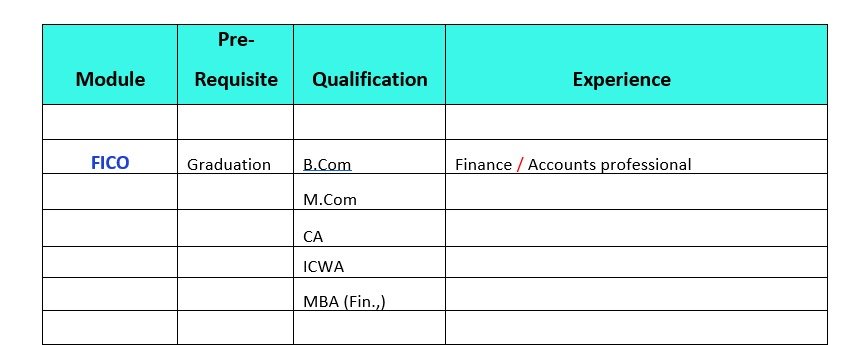
SAP FICO - COURSE CONTENT
SAP Finance & Controlling (FICO) Module is a Functional Module of SAP Software. Finance activity or processes of an Organization is mapped with the help of FICO Module
I. Introduction:
- Introduction to ERP, Advantages of SAP over other ERP Packages
- Introduction to SAP R/3 – S/4 HANA Finance
- System Landscape
- System Architectures
- Introduction to G/L (NEW G/L), A/R, A/P, AA.
- Introduction to Banking and Treasury Management.
- Introduction to CEA, CCA, EC- PCA, CO-PA and PC.
II. Financial Accounting Basic Settings:
- Creation and assignment of company and company code
- Creation of business area, Consolidation Business area, Functional Area, Financial Management Area, Segment and Credit Control Area and Assignment.
- Creating Leading, Non- Leading and Rep- Ledger.(New GL Accounting)
- Defining and assignment of fiscal year variant, Posting Period Variant, Open and Close Posting Periods.
- Defining Document type & Number ranges
- Define Posting Keys.
- Maintenance and assignment of field status variants
- Defining and assignment of Tolerance groups of employees, General Ledger.
- Assign User Tolerance Groups.
- Taxes on Sales & Purchases (Basic Settings)
- Creation of Chart of Accounts, Account Groups and Retained Earnings.
III. General Ledger Accounting:
- Creation of General Ledger Master (with and without reference)
- LSMW- Legacy System Migration Workbench.
- Display/Change/Block/Unblock of general ledger master
- Creation of Account Assignment model and posting
- Defining Recurring entry document, Run Schedule, Run Dates and posting
- Creation of Sample Document and posting
- Interest Configuration (Balance Interest).
- Configuration of line layouts for display of GL line items.
- Create Screen Layouts.
Testing:
- Document Entry posting normal postings posting with reference
- Display and change of documents.
- Display of GL balances and Line items
- Parked documents & hold documents
- Reversal of individual documents, mass Reversal, reversal of cleared items and reversal of accrual and deferral documents.
IV. Bank Configuration:
- House Bank Application, Creation, Mapping of GL Accounts.
- Cheque Lot Creation.
- Cash Journal/ Petty Cash.
- Bank account interest calculation
- Lockbox Principles
- Bank Reconciliation Statements.
- Automatic Bank Reconciliation.
- Manual Bank Reconciliation.
V. Accounts Receivable (Customer):
- Creation of Customer account groups and assignment of number ranges
- LSMW - Legacy System Migration Workbench.
- Creation of Tolerance group for customers
- Interest Configuration. (A/R)
- Down Payment Creation and Configuration
- Bills of Exchange.
- Creation of Customer Master (Display/Change/Block/un-block of CustomerMaster)
- Customer Terms. (Fix Day & Number of Days Method)
- Customer Discounts and Methods.
- Reserve for Bad-debts. (Basic Settings and Master Data)
- Configuration of settings for Dunning.
- Automatic Clearing.
VI. Accounts Payable (Vendor):
- Creation of Vendor Account groups and assignment of number ranges
- LSMW - Legacy System Migration Workbench.
- Creation of Vendor Master (display/change/block/un-block of vender master)
- Creation of Tolerance group for venders
- Interest Configuration.
- Down Payment Creation and Configuration.
- Terms of Payment. (Vendor Installments)
- Creation of House banks and Technical Ids.
- Configuration of Automatic payment program
- Defining correspondence & party statement of accounts.
- Automatic Clearing.
X. Taxes:
- Withholding Tax. (TDS)
- Global Taxes.
- GST (In-depth)
Testing.
- Posting of customer transactions (sales invoice posting, payment posting, debit memo).
- Settings for advance payment from parties (down payment).
- Defining correspondence & party statement of accounts.
- Posting of vendor transactions (invoice posting, payment posting, credit memo).
- Settings for advance payments to parties (down payment) and clearing of down payment against invoices (special GL transactions).
- Posting of partial Payment & Residual Payment.
- Payment to vendors through APP.
- Asset under Construction.
XII. Data Migration:
- LSMW - Legacy System Migration Workbench. (Batch input Method, I-Doc)
Asset Accounting:
- Defining chart of depreciation
- Defining Account Determination, screen layout, number ranges and asset classes.
- Integration with General Ledger (AO90) & Posting rules. (OAYR)
- Creation of asset master and sub asset master (change/display/block/unblock).
- Defining Depreciation key (base, declining, multilevel, period control methods).
- Acquisition or purchase of assets, sale of assets.
- Scrapping of assets, Transfer of assets.
- Post Capitalization and write up.
- Depreciation run.
- Line Settle of assets under construction of capital work in progress.
XII. Data Migration:
- sset Purchase Posting.
- Sale of Asset.
- Transfer of Asset.
- Scrapping of Asset.
- Depreciation Run
VII. Cross- Company Code Transactions / New GL Accounting:
- Define Field Status Variant
- Define Currencies of Leading Ledger
- Assign Scenario and Customer Fields to Ledger
- Assign Posting Period Variant to Company Code
- Define Accounting principles
- Assign Accounting principles to Ledger Groups
- Assign Variant for Real Time Integration to Company Code
- Define Document Number Ranges for Entry View
- Define Document Number Ranges for General Ledger View
- Define Document Type for Entry View in a Ledger
- Define Document Type for General Ledger View
- Classify Document Type for Document Splitting
- Activate Document Splitting
- Define Zero Balance Clearing Account
- Document Splitting Characteristics
- Define Posting Keys for Incoming Invoices a7 Credit Memo
- Create Dummy Profit Centre.
VIII. Integration with MM:
- Movement types, Valuation class, Valuation area
- Valuation grouping, Material types, Define plant, Define division
- Maintain storage location, Maintain purchasing organization.
- Assign plant to company code,Assign business area to plant/valuation area and division.
- Assign purchasing organization to company code, Creation of material group.
- Maintain company code for material management, Define attributes of material types.
- Set tolerance group for purchase orders, Set tolerance limits group for goods receipt.
- Plant parameters, Maintain default values for tax codes.
- Set tolerance limits for goods receipt, Plant parameters.
- Maintain default values for tax codes, Set tolerance limits for invoice verification.
- Define automatic status change, Group together valuation areas.
- Configure automatic posting, Document type & number ranges.
- Material master creation, To open material periods.
Testing:
- Purchase Requisition (ME51N)
- Purchase Order (ME21N)
- Goods Receipt (MIGO)
- Invoice Verification (MIRO)
- Payment to Vendor: F-53/ F110
Integration with SD.
- Define sales organization
- Define distribution channel
- Define shipping point
- Assign sales organization to company code
- Assign distribution channel to sales organization
- Assign division to sales organization
- Setup sales area
- Assign sales organization distribution channel plant
- Define rules by sales area
- Assign shipping point to plant
- Define pricing procedure determination
- Define tax determination rules
- Assignment of accounts for automatic postings
- Setup partner determination
- Assign shipping points
- Creation of condition types
Testing:
- Sales Quotation (VA21)
- Sales Order (VA01)
- Delivery against Sales Order (VL01N)
- Customer Billing (VF01)
- Customer Payment (F-28)
IX. Screen Variants
X. User Creation (Basis Consultant Roles)
- User Creation
- Role Authorizations
- Assign Tolerance to Users
- Transport Request Creation and Maintenance
XI. FI / SD Credit Management
- Define credit controlling areas
- Define Risk Categories
- Define Credit Groups
- Assign Sales Document & Delivery Document
XII. Cutover Activities
- Receivable Takeover
- Payable Takeover
- Asset Takeover
- GL Takeover
XIII. Final Preparation
- Define Financial Statement Version
- Balance carry forward Balances
- Month ending Activities
- Structure of Account Balances
- FI-CO Tables
XIV. Reports
- Financial statement version
- General Ledger, Accounts Payable, Accounts Receivable and Assets Reports
- Functional Specifications
- RICEF Reports
XV. Basic Settings for Controlling
- Maintain Controlling Area
- Activate control indicators/components
- Defining Number ranges for Controlling Area
- Maintain Planning Versions
XVI. Cost Element Accounting
- Creation of Primary and Secondary Cost Elements
- Creation of Cost Element Groups
- Primary and Secondary cost element categories
XVII. Cost Center Accounting
- Defining Cost Center Standard Hierarchy
- Creation of Cost Centers and cost center groups
- Planning for cost center, posting to cost centers
- Repost of Costs
- Overhead Calculation
- Creation and Execution of Distribution Cycle
- Creation and execution of assessment cycles
- Cost center reports
XVIII. Internal Orders
- Statistical Internal Order
- Real Internal Order
- Defining order types
- Creation of internal orders
- Planning of internal orders
- Postings to internal order
- Variance analysis reports
XIX. Profit Center Accounting
- Basic Settings for Profit Center Accounting
- Creation of Dummy Profit Centers
- Maintaining versions for profit centers
- Creation of profit centers and groups
- Creation of revenue cost elements
- Automatic Assignment of Revenue elements for Profit Centers
- Postings to profit centers, planning and variance reporting
XX. Commitment Management
- Assign Fiscal Year Variant to FM Area
- Assign Field Status Variant to Company Code
- Create Field Status Variant
- Create Commitment Item
- Mapping of Commitment Item
- Enter Values into Commitment Item
XXI. Budgetary Control
XXII. Product Costing
- Define Cost Sheet
- Define cost component structure
- Define MRP controller
- Define production controller
- Create Bill of Material
XXIII. Profitability Analysis
- Defining the operating concern
- Define profitability segment characteristics
- Activating the profitability analysis
- Creation of data structures
- Flow of actual values
- Creation of reports
- Execution of reports
- Define forms
Real Time Concepts
- SAP ASAP Methodology & Agile Methodology (Theory)
- SAP Ticketing Tool
- Overview of SAP R/3 Structure
- RICEF Concept
- New G/L Accounting
- GST
- Cross module integration of FI-MM
- Cross module integration of FI-SD
- Electronic Bank Statement (EBS)
- Functional Specs (FS)
- How I-Doc’s Work & FI Consultant Roles
- DMEE
- Data Migration tools of LSMW & BDC
- Preparation of Test Scripts
Why Choose Bruhas Technologies
For SAP Training in Hyderabad
If you are going to use a passage of you need to be sure there isn't anything embarrassing hidden in the middle of text
Overseas Consulting
If you are going to use a passage of Lorem Ipsum, you need to be sure there isn't anything embarrassing hidden in the middle of text
Learn SAP Courses Online
If you are going to use a passage of Lorem Ipsum, you need to be sure there isn't anything embarrassing hidden in the middle of text
Expert SAP Instructors
If you are going to use a passage of Lorem Ipsum, you need to be sure there isn't anything embarrassing hidden in the middle of text
Real-Time Training Programs
If you are going to use a passage of Lorem Ipsum, you need to be sure there isn't anything embarrassing hidden in the middle of text
Job Oriented Training
If you are going to use a passage of Lorem Ipsum, you need to be sure there isn't anything embarrassing hidden in the middle of text
100% Placement assistance
If you are going to use a passage of Lorem Ipsum, you need to be sure there isn't anything embarrassing hidden in the middle of text

Contact Bruhas Technologies
SAP Training Institute in AmeerpetBruhas Tech Contact info:
- Address: 202/A, 2nd Floor, Greenhouse Building, Beside Aditya Trade Centre, Ameerpet, Hyderabad - 500038
- Email: info@bruhastech.com
-
Phone:
+91 76759 66560
-
Timings:
7.30am to 10.30pm
- Social:
SAP Training Institute in Hyderabad | Bruhas Technologies Ameerpet
Bruhas Technologies offers intensive, real-time SAP training across high-demand functional and technical modules, including FICO, MM, SD, HANA, and ABAP. Our courses are designed and led by industry expert trainers with years of experience, ensuring you gain comprehensive, practical, and highly relevant skills needed for immediate career entry and strong performance in the IT sector.
We prioritize a unique, project-based learning methodology, guaranteeing you not only conceptual clarity but also hands-on proficiency. We provide crucial dedicated placement assistance, along with vital access to live SAP servers for extensive, industry-relevant practice to ensure full certification readiness and confidence.
Latin literature from 45 BC
Vivamus bibendum magna
10+ Years of Experience
10+ Years of Experience
10+ Years of Experience
Chemistry Teacher
Our SAP Students Say!
If you are going to use a passage of Lorem Ipsum, you need to be sure there isn't anything embarrassing hidden in the middle of text
SAP FICO Training in Hyderabad | FAQs | Bruhas Technologies
Learn top SAP modules like FICO, MM, SD, HANA, and ABAP to enhance skills and boost your IT career growth.
The SAP FICO (Financial Accounting and Controlling) course at Bruhas Technologies provides comprehensive, hands-on training on all FICO modules — including general ledger, accounts payable, accounts receivable, asset accounting, cost center accounting, profit center accounting, and integration with other SAP modules. The course prepares students for real-time project execution and SAP FICO certification success.
Yes. Bruhas Technologies offers SAP FICO training with placement support in reputed MNCs and IT companies. The placement team assists students with resume building, interview preparation, and connecting with recruiters to help secure SAP FICO job opportunities after course completion.
You can book a free demo class by contacting Bruhas Technologies directly through WhatsApp or phone.
📞 Phone: +91 76759 66560
📍 Address: 2nd Floor, Greenhouse Building, Beside Aditya Trade Centre, Ameerpet, Hyderabad – 500036.
Our team will schedule your demo session at your preferred time between 7:30 AM and 10:30 PM, Monday to Saturday.
The demo class will provide insights into SAP FICO modules, accounting processes, controlling, and real-time project scenarios.
The SAP FICO training fee at Bruhas Technologies is structured to be affordable for students and professionals. Fees vary based on the mode (classroom or online) and duration. Contact us via WhatsApp or call +91 76759 66560 for updated fee details.
Absolutely. Every SAP FICO trainee gets exposure to real-time business scenarios, including financial accounting, controlling processes, cost center management, and integration with other SAP modules. Trainers provide live project guidance to build practical, industry-ready skills.
You can reach Bruhas Technologies for SAP FICO queries or enrollment through the following channels:
📍 Address: 2nd Floor, Greenhouse Building, Beside Aditya Trade Centre, Ameerpet, Hyderabad – 500036
- 📧 Email: info@bruhastech.com
- 📞 Phone: +91 76759 66560
- 🕒 Working Hours: 7:30 AM to 10:30 PM
- 📅 Days: Monday – Saturday
Our team will guide you with SAP FICO modules, demo scheduling, certification details, and career support.
Start your SAP FICO career with Bruhas Technologies today!
SAP FICO Training
Learn top SAP modules like FICO, MM, SD, HANA, and ABAP to enhance skills and boost your IT career growth.
Visit Our SAP Training Institute in Hyderabad
Build your SAP Career Together With Bruhas Tech
If you are going to use a passage of Lorem Ipsum you need to be anything hidden in the middle of text
High Demanded SAP Modules
Learn top SAP modules like FICO, MM, SD, HANA, and ABAP to enhance skills and boost your IT career growth.

Sales & Distribution (SD)
SD software streamlines sales (quotes, orders, deliveries) for faster customer service and provides real-time inventory control to avoid stockouts.real-time inventory control to avoid stockouts.

Finance and Controlling (FICO)
SD software streamlines sales (quotes, orders, deliveries) for faster customer service and provides real-time inventory control to avoid stockouts.real-time inventory control to avoid stockouts.

Material Management (MM)
SD software streamlines sales (quotes, orders, deliveries) for faster customer service and provides real-time inventory control to avoid stockouts.real-time inventory control to avoid stockouts.
Get Highly paid IT Job with SAP Training!
If you are going to use a passage of embarrassing hidden in the middle of text
Alia Noor
We denounce with righteous indignation and dislike men who are so beguiled and demoralized by the charms of pleasure of the moment, so blinded by desire that the cannot foresee the pain and trouble that.